
Start
Examples
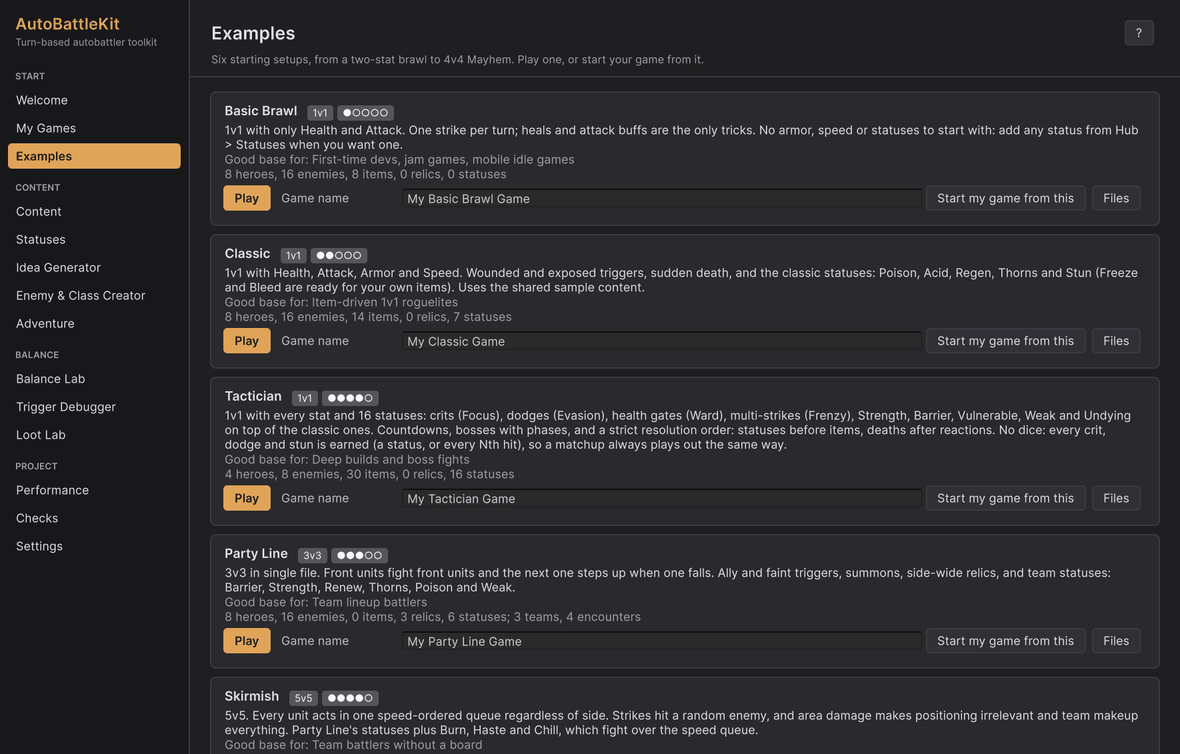
Six complete starting setups, from a two-stat brawl to a 4v4 with everything switched on. Each is a ruleset, its own content and example line-ups. Your game starts as a copy of one.
Hub › Examples| Preset | Format | Stats | What makes it different |
|---|---|---|---|
 Basic Brawl Basic Brawl |
1v1 | Health, Attack | One strike a turn; heals and attack buffs only. No statuses: add any from the Statuses page. |
 Classic Classic |
1v1 | Health, Attack, Armor, Speed | The kit's own content: wounded, exposed; Poison, Acid, Regen, Thorns, Stun (Freeze and Bleed ready to use). |
 Tactician Tactician |
1v1 | All | 16 statuses including Focus, Evasion, Ward, Frenzy, Strength, Barrier and Undying; countdowns and boss phases; statuses before items; deaths after reactions. No dice: crits, dodges and stuns are earned, so a matchup always plays out the same way. |
 Party Line Party Line |
3v3 | Health, Attack, Speed | Single file; ally and faint triggers, summons, relics; Barrier, Strength, Renew, Thorns, Poison, Weak. |
 Skirmish Skirmish |
5v5 | Health, Attack, Speed | One speed queue for every fighter; random targets; area damage; Party Line's statuses plus Burn, Haste and Chill. |
 Mayhem Mayhem |
4v4 | All | Everything switched on: all 27 statuses, one speed queue, random targets and tie-breaks, crits and dodges by chance, summons, relics, thefts, friendly fire, two bosses, sudden death from round 12. A chaotic mess on purpose: if a design survives Mayhem it survives anything. |
They live in the kit's Presets folder, one folder each, with their content laid out like the kit's own: Presets/Skirmish/Content/Enemies/Goblin/....
Play one, or start from one
- Play opens the 10 Preset Arena demo on that example and presses Play: flip through its heroes and enemies (or teams and encounters) and press Win rate to simulate 200 seeds of a matchup.
- Start my game from this (or New game on the Welcome page) copies the example's rules and content into
Assets/<your game name>, one folder per entity, with its own art, a battle scene and a copy of the line-ups, and makes it your active game. Nothing in the kit folder changes.
My Games
Hub › My Games lists the games you've made, each with Play (its battle scene), Make active and edit and Files. The Hub works on one game at a time: the Content, Statuses, Creator and Balance pages all show the active one, and the block menus hide the groups its ruleset doesn't use. A content database that has no battle scene of its own (made by hand or by a script) is listed too, marked content only. New game... opens the wizard on the Welcome page.
What a team preset gets you
With a team preset in use (Party Line, Skirmish, Mayhem, or your own with a max team size above 1):
- Your game's
My Battlescene plays the preset's teams against its encounters, with the trigger log beside it and a Multi mode grid. - The Balance Lab runs every team against every encounter (loadout items are dealt across a team, front to back), and the Trigger Debugger picks a team and an encounter.
- The Idea Generator offers team themes (area damage, ally triggers).
- An Adventure with the team ruleset is a party run: several heroes on the road, enemy groups, one shared bag.

TipNot sure which to pick? Start from Classic for a 1v1 game with items and statuses, Party Line if your game has a team of heroes, or Mayhem to see every block the kit has in one fight.
Under the hood each example is a Game Preset asset (Create › AutoBattleKit › Game Preset): a ruleset, a database and line-ups. Your game gets one too, so you can ship your own setups the same way.