
Make content
Creator & ideas
Two Hub pages for making content fast: the Enemy & Class Creator turns sprites into fighters, and the Idea Generator invents items and tests them for you.
Hub › Enemy & Class Creator · Idea GeneratorThe sprite library
No art yet? The Creator shows every fighter picture in the kit: the spare fighters in Demos/Shared/Art/PixelArt/Library (8 heroes, 16 monsters, 4 bosses) and the pack's own 8 heroes, 15 enemies and boss.
- Click a picture. A panel under the grid says what it will be: its health, attack, armor and speed, its powers in plain English, and the item it carries.
- Pick Normal, Elite or Boss if you want it stronger than it comes.
- Press Create Dragon (the button is named after the picture). Nothing is made until you press it.
The PNG is copied into the fighter's folder with its five colour variants, so recolour or repaint it freely.
Fighters that are what their name says
A fighter made from a picture or a name the kit knows gets stats, powers and items to match. Any missing statuses are added to your game from the status library.
| Name contains | You get |
|---|---|
| dragon | Boss. 68 health, burns on a timer and with its claws, hits harder when wounded. Carries Dragonheart (legendary). |
| golem | High armor (10) that grows back every second turn; +2 attack once it breaks. |
| spider, cobra, scorpion, bee | Poison on every hit. |
| knight | Carries the Knight's Shield (+3 armor, stuns whoever breaks it), wears thorns, survives one killing blow. |
| wolf, bandit | Bleed. |
| troll, treant, mushroom | Regen. |
| wraith, wisp, harpy, assassin | Evasion. |
| yeti | Chill on hit, freeze when wounded. |
| fire elemental, imp | Burn, or acid that eats armor. |
| goblin king, lich king, iron golem prime | Bosses, each with its own legendary: Goblin King's Crown, Phylactery, Prime Core. |
About forty names are known (the full list is FighterArchetypes.All in Scripts/Editor/Content/FighterArchetypes.cs; add your own there). A name the kit doesn't know uses the numbers in the form, which follow the Tier: Normal 22 health and 3 attack, Elite 36 and 4, Boss 60 and 5.
Any boss carries a legendary. Make a spider a boss and it gets 2.4 times the health, +2 attack and armor, and the Venom Gland. The items are real items in your database, so they can drop: Hub › Loot Lab > New boss drop table makes a table of them.

Good to knowHow strong is that? Against the pack's eight heroes with four random items, players beat the normal monsters 80 to 99% of the time, the elites 60 to 80%, and the bosses 4 to 34%. With only two items those drop to about 20-80%, 5-25% and 0-3%: bosses are for the end of a run. Untick Stats and powers from the name to always use your own numbers.
Enemy & Class Creator
Make a fighter
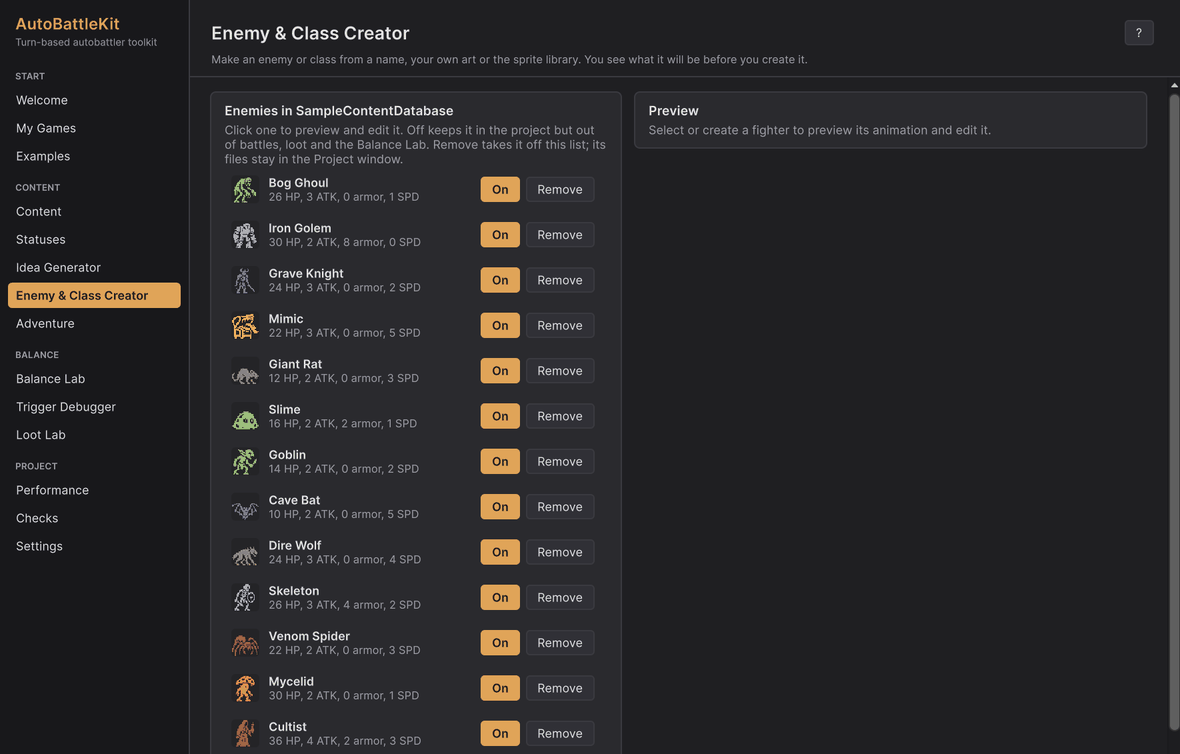
Type a name and press Create enemy (or Create class). No art yet? It gets a placeholder pixel creature. Have art? Drag sprites (or a whole folder) onto the drop zone to make one fighter per image, named after the files.

Set its numbers
The Numbers card has Name, Health, Attack, Armor, Speed and Tier as plain boxes. The list at the top left shows every enemy in your game: On / Off leaves one out of battles without deleting it, and Remove takes it off the list (its files stay in the Project window).

Preview its animation
Lunge, Hit and Die play the procedural animation. Give it its own Animation Profile to change the bob, lunge distance, hit flash and death.

Give it items
Tick Uses items, then click items from your database to give them or take them away. Untick it to test the enemy without its gear; the picks are kept. Classes get the same picker for their starting items.

Fight it
Fight it runs it against every class (or every enemy) and shows the win rates, so you know at once whether it's a pushover or a wall.
Everything it makes gets its own folder with art, colour variants and a prefab, like any other content.
Idea Generator
Stuck for item ideas? Hub › Idea Generator builds items from the kit's blocks around themes you pick.
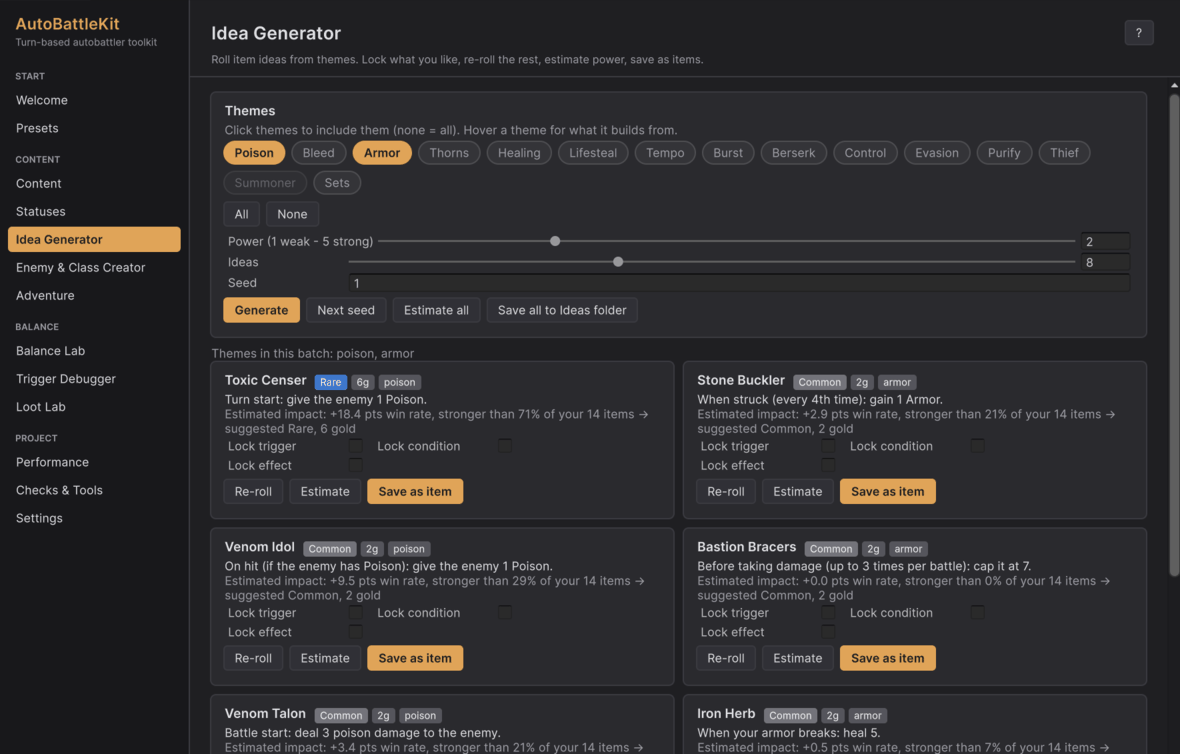
- Tick themes: poison, bleed, armor, thorns, healing, lifesteal, tempo, burst, berserk, control, evasion, purify, thief, summoner, sets. Hover a chip to see the blocks it uses.
- Set the power level and a seed, then Generate. Ideas only come from the themes you ticked, spread evenly.
- Lock the trigger, condition or effect you like and Re-roll the rest.
- Estimate simulates an idea against your classes and enemies, and each of your items the same way, then suggests a rarity and cost from how the idea ranks: stronger than fewer than 40% of your items is Common, 70% Uncommon, 90% Rare, the rest Epic, and Legendary only if it beats every item. With no items to compare, it uses a fixed scale.
- Save as item adds it to your database in its own folder. Save all to Ideas folder keeps a batch to review later.
TipThe seed makes the ideas repeatable: the same themes, power and seed always give the same list.