
Make content
Abilities
Everything an item, status, hero or enemy does is an ability: when it happens, what must be true, and what it does. You build them from blocks in the Inspector.
Trigger, conditions, effects

Read it like a sentenceOn hit (30% chance): give the enemy 2 Poison.
Trigger · condition · effect
| Part | What it does | Examples |
|---|---|---|
| Trigger | When the ability is checked | Battle start, Turn start, On hit, When struck, Before you strike, When wounded, When you die, After winning a battle |
| Scope | Whose events it hears | Self (default), Opponent, Ally, Any |
| Conditions | All must pass first | Chance, Every Nth Turn, Once Per Battle, Health Below % (yours or the enemy's), Has Status, Not, Item Tag Count |
| Effects | Run in order | Deal Damage, Gain Armor, Heal, Apply Status, Lifesteal, Critical Strike, Summon Unit, Dodge |
| Priority | Higher resolves first when several abilities hear the same event | 0 by default |
| Countdown | With the Countdown trigger, fires every N turns (or once after N) | "Every 4 turns: gain 3 attack" |
Build one
Add it
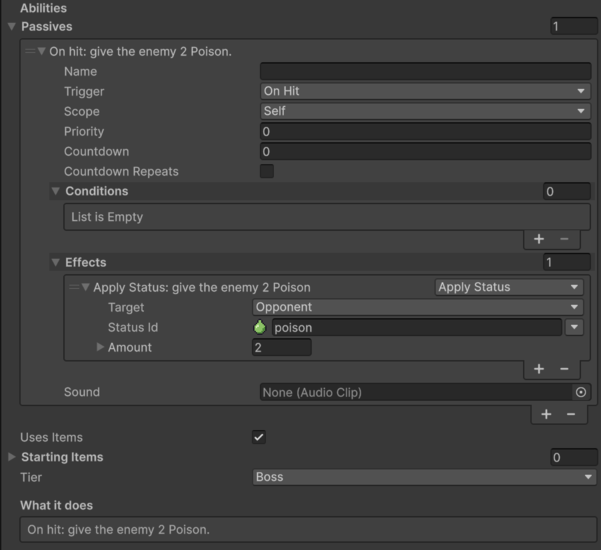
On an item or status press Abilities > +. On a hero or enemy press Passives > +.
Pick the trigger
Choose when it happens. Before triggers (Before you strike, Before you are struck, Before taking damage, Before you would die) run before the action lands, so their effects can change or cancel it.
Add conditions (optional)
Conditions > + and pick from the menu: Chance, Limit › Once Per Battle, Health › Health Below Percent...
For the opposite of a condition, pick Logic › Not and put the condition inside it. Not + Has Status (Self, poison) reads "if you have no Poison". Health Below Percent and Health Above Percent have a Who field: set it to Opponent for an execute ("if the enemy is at or below 30% health").
Add effects
Effects > + and pick: Damage › Deal Damage, Status › Apply Status, Healing › Heal... Each has a target (you, the enemy, all enemies, the lowest-health ally...) and an amount.
Amounts
Every amount can be a flat number, or grow with something:
| Option | Reads as | Use it for |
|---|---|---|
| Flat | "deal 3 damage" | Most things |
| Per stack | "deal 1 damage per stack" | Statuses that grow (poison, strength) |
| Per tier | "gain 2 armor per tier" | Items that scale with their tier |
| Of a stat | "heal 30% of your max health" | Heals and lifesteal that scale |
| Of the event | "reflect 50% of the damage" | Reactions on Before/When triggers |
| Scale with item power | "deal 4 damage (scaled)" | Items that grow with rarity and tier |
When several fire at once
When one event wakes up several abilities, they resolve in this order:
- higher priority first,
- then the fighter the event happened to (or always the player side, a ruleset choice),
- then passives, then items in slot order, then statuses (after items by default),
- then the order they were found.
Effects that cause new events (damage causes When you lose health, On hit, When struck) queue them, and the queue resolves after the current action. The Trigger Debugger shows the chain for any battle.
TipHide what your game doesn't use. A Ruleset's Hidden Block Groups moves whole groups (Team, Event, Status...) out of the menus, so beginners only see what matters.
The complete list of blocks, with every field, is in the Block reference. When the blocks can't do something, write your own.